LoFi M1
A Korg M1, on your own ROMs: the card’s programs, combis and effects.
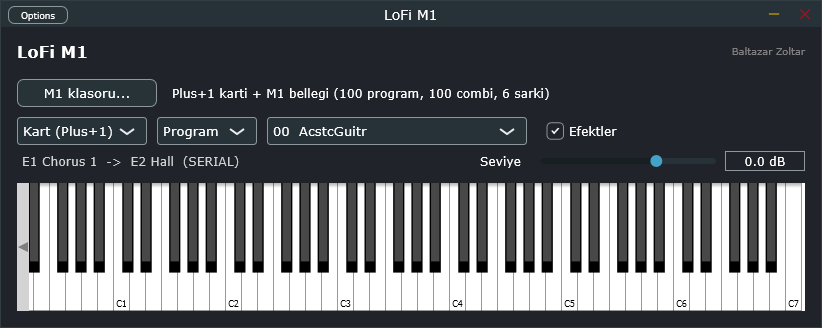
It does not imitate the M1’s sound chips; it models what they do, playing the M1’s own samples and programs through tables decoded from its operating system.
- Programs and combis: the Plus+1 card’s 100 programs and 100 combis. Give it a SysEx dump of the M1’s memory and that bank and its songs come along too.
- The M1’s own arithmetic: envelopes, LFOs, the VDF filter curve, DWGS waves and drum kits; 33 effect types, in series or in parallel.
- As you play: velocity, pitch bend, aftertouch, the joystick (CC 1 / 2), sustain, program change; slow / fast on the Rotary.
- In a DAW or on its own: a VST3 instrument and a standalone Windows app, the same engine in both.
Who it is for: M1 owners
LoFi M1 and LoFi Engine M1 are for people who own a Korg M1 (and a Plus+1 card) and can read its ROM chips with an EPROM reader. Neither contains any Korg data; the M1 sounds need your own dumps. The factory programs (the preload) are a single .syx file with no sound in it; the sounds and the operating system are in the chips inside the M1. Put the chip files from your reader as they are into a rom folder inside any folder and pick that folder in the program: it recognises the chips by their contents or names and puts them together on the first start, with no other tool or preparation. The chips it needs are listed in the package’s KURULUM.txt (in Turkish). We do not distribute ROMs and cannot help with finding them.
Download
Windows 10 and 11, 64-bit. Unzip it: LoFi M1.exe runs on its own. For the VST3, copy the VST3\LoFi M1.vst3 folder into C:\Program Files\Common Files\VST3 and rescan plugins in your DAW. The files are unsigned, so Windows SmartScreen may warn you: More info → Run anyway.
LoFi Engine M1
The endless lo-fi radio of LoFi Engine, on the M1’s sounds: chords, bass, melody and drums from M1 programs, each through its own effects. LoFi M1’s engine plays the notes; all of it in one Windows program, nothing else to install.
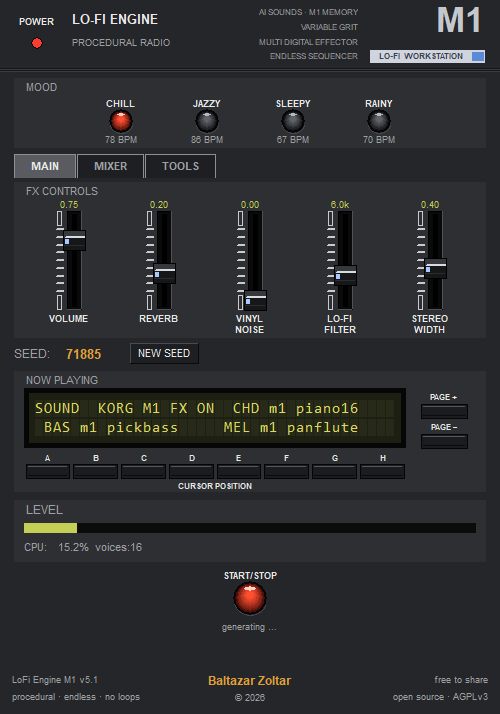
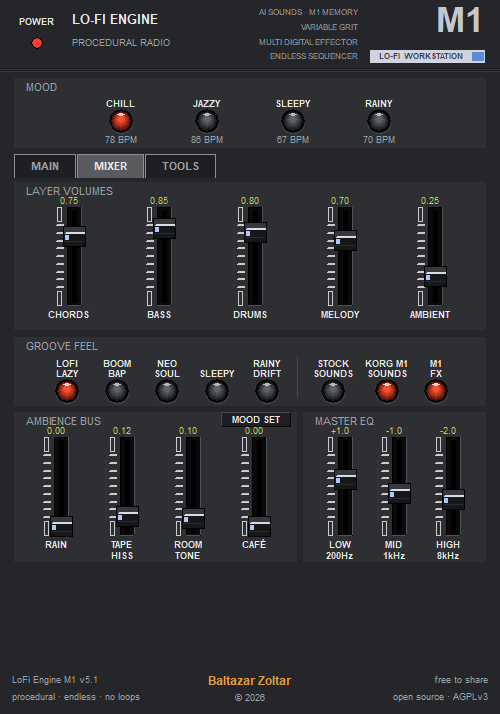
- M1 sounds: Piano 16’, E.Piano, Pick Bass, Pan Flute, Lore, Choir, Piano Vox and more than 20 programs and combis; with a dump of the M1’s memory, its sounds lead.
- The M1 drum kit and effects: the card’s M1 Drums kit; every sound through its own E1 / E2 effect chain (the M1 FX key turns them off).
- The front panel: the M1’s keys, faders and 2 × 40 character LCD, its pages showing the sounds playing, the groove and the mixer.
- Plays without ROMs too: with no M1 folder chosen, on LoFi Engine’s own sounds.
Windows 10 and 11, 64-bit. Unzip it and run LoFi Engine M1.exe. For the M1 sounds, choose the ROM folder above under TOOLS → KORG M1 DATA → M1 FOLDER …; details in the package’s OKUBENI.txt (Turkish, with an English summary). LoFi Engine M1 is AGPLv3 too, its source above. The file is unsigned, so Windows SmartScreen may warn you: More info → Run anyway.
The app and the plugin are built with JUCE under JUCE’s AGPLv3 option, and LoFi M1 itself is AGPLv3. That licence gives everyone who receives a binary the right to the corresponding source under the same terms, which is why the source package is up there too. It holds no ROM or ROM-derived data.
Korg and M1 are trademarks of Korg Inc. LoFi M1 is an independent project, not affiliated with or endorsed by Korg.